In this post, Will try to show some basic of Swagger with .NET 6 as well as how to generate example request to make testing handy.
Create a new Web API project with enabling the OpenAPI support.

To add API information and description update builder.Services.AddSwaggerGen() like bellow example:
					using Microsoft.OpenApi.Models;
builder.Services.AddSwaggerGen(c =>
{
    c.SwaggerDoc("v1", new OpenApiInfo
    {
        Title = "WeatherForecast",
        Version = "v1",
        Description = "This is the API for managing WeatherForecast",
        TermsOfService = new Uri("https://www.linkedin.com/in/khairultaher"),
        Contact = new OpenApiContact
        {
            Name = "khairul Alam",
            Email = "abc@gmail.com",
            Url = new Uri("https://www.linkedin.com/in/khairultaher")
        },
        License = new OpenApiLicense
        {
            Name = "Use under LICX",
            Url = new Uri("https://www.linkedin.com/in/khairultaher"),
        }
    });
}
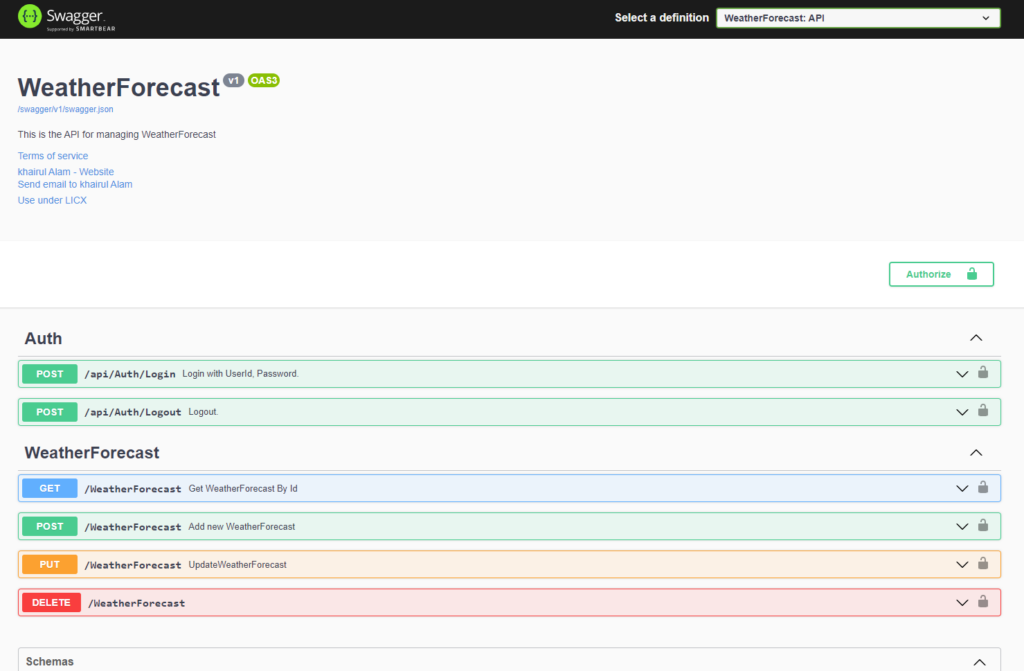
Run the app and see the API info and description:

To enable xml comment open .csporj file update propertygroup with these two item:
					<PropertyGroup>
  ......
  <GenerateDocumentationFile>True</GenerateDocumentationFile>
  <NoWarn>$(NoWarn);1591</NoWarn>
</PropertyGroup>
Now configure swagger to use generated xml:
					builder.Services.AddSwaggerGen(c =>
{
    ........
    var xmlFile = $"{Assembly.GetExecutingAssembly().GetName().Name}.xml";
    var xmlPath = Path.Combine(AppContext.BaseDirectory, xmlFile);
    c.IncludeXmlComments(xmlPath);
});
Go to WeatherForecast controller and add comment on Create action like bellow example:
For POST/PUT:
					/// <summary>
/// Add new WeatherForecast
/// </summary>
/// <param name="model"></param>
/// <returns>Return success/fail status</returns>
/// <remarks>
/// **Sample request body:**
///
///     {
///        "id": 1,
///        "Date": "2022-06-24",
///        "TemperatureC": 30,
///        "Summary": "TemperatureC is 30 today",
///     }
///
/// </remarks>
/// <response code="200">Success</response>
/// <response code="401">Failed/Unauthorized</response>
[HttpPost]
[ProducesResponseType(typeof(WeatherForecast), 201)]
[ProducesResponseType(400)]
public async Task<ActionResult<WeatherForecast>> Create([FromBody] WeatherForecast model)
{
    WeatherForecast weatherForecast = new WeatherForecast()
    {
        Id = model.Id,
        Date = model.Date,
        TemperatureC =  model.TemperatureC,
        Summary = model.Summary
    };
    return await Task.FromResult(weatherForecast);
}
By runnig the app we will see the information are adedd to swagger:

Look into the example value, see that it show the default values. now we want here to add example value for testing. To do so add Swashbuckle.AspNetCore.Filters NuGet package.
update
					using Swashbuckle.AspNetCore.Filters;
builder.Services.AddSwaggerGen(c =>
{
   .........
    c.ExampleFilters();
    var xmlFile = $"{Assembly.GetExecutingAssembly().GetName().Name}.xml";
    var xmlPath = Path.Combine(AppContext.BaseDirectory, xmlFile);
    c.IncludeXmlComments(xmlPath);
}
builder.Services.AddSwaggerExamplesFromAssemblies(Assembly.GetEntryAssembly());
Now add new class that will generate example value for the WeatherForecast class.
					using Swashbuckle.AspNetCore.Filters;
namespace SwaggerExample
{
    public class WeatherForecastRequestExample : IExamplesProvider<WeatherForecast>
    {
        public WeatherForecast GetExamples()
        {
            return new WeatherForecast()
            {
                Id = 1,
                Date = DateTime.Now,
                TemperatureC = Random.Shared.Next(-20, 55),
                Summary = "test data"
            };
        }
    }
}
rebuild and run the the app again.

For GET/DELETE request:
					/// <summary>
/// Get WeatherForecast By Id
/// </summary>
///<param name="id" example="2">The product id</param>
/// <returns>Return success/fail status</returns>
/// <remarks>
/// **Sample request body:**
///
///     {
///        "id": 2
///     }
///
/// </remarks>
/// <response code="200">Success</response>
/// <response code="401">Failed/Unauthorized</response>
[HttpGet]
[ProducesResponseType(typeof(WeatherForecast), 200)]
[ProducesResponseType(400)]
public ActionResult<WeatherForecast> Get([FromQuery] int id)
{
    return Enumerable.Range(1, 5)
        .Select(index => new WeatherForecast
        {
            Id = index,
            Date = DateTime.Now.AddDays(index),
            TemperatureC = Random.Shared.Next(-20, 55),
            Summary = Summaries[Random.Shared.Next(Summaries.Length)]
        }).Where(w => w.Id == id).FirstOrDefault()!;
}

Swagger shows all available schema information like above but if we don’t want to show them then just add DefaultModelsExpandDepth(-1)
					app.UseSwagger();
app.UseSwaggerUI(x =>
{
    x.SwaggerEndpoint("/swagger/v1/swagger.json", "WeatherForecast: API");
    x.DefaultModelsExpandDepth(-1);
});
Implement authorization:
Take advantage of authentication and authorization to secure your Swagger UI in .NET Core 6
					builder.Services.AddSwaggerGen(c =>
{
    .......
    c.AddSecurityDefinition("Bearer", new OpenApiSecurityScheme()
    {
        Name = "Authorization",
        Type = SecuritySchemeType.ApiKey,
        Scheme = "Bearer",
        BearerFormat = "JWT",
        In = ParameterLocation.Header,
        Description = "JWT Authorization header using the Bearer scheme. \r\n\r\n Enter 'Bearer' [space] and then your token in the text input below.\r\n\r\nExample: \"Bearer 1safsfsdfdfd\"",
    });
    c.AddSecurityRequirement(new OpenApiSecurityRequirement {
        {
            new OpenApiSecurityScheme {
                Reference = new OpenApiReference {
                    Type = ReferenceType.SecurityScheme,
                        Id = "Bearer"
                }
            },
            new string[] {}
        }
    });

   ......
});