Flutter is an open-source mobile development framework developed by Google that is used to build fast and efficient applications suitable for multiple platforms. The popularity of this framework is growing fast. About 46% of cross-platform developers now rely on it for mobile app development.
It turns the Dart language into real machine-level code, so your app runs faster on any screen. Around 56.4% of tech leaders find it a 50% faster framework compared to native technologies.
These are the leading advantages of Flutter, making it a preferred choice globally for app development:
- Faster development with hot reload.
- Adjustable layouts with pre-built widgets.
- Ideal for MVPs and quick validation.
- Advanced Firebase and cloud integration.
- Cost-efficient app development
- Maintains the same quality of the native app.
Key Takeaways
- Flutter app development offers faster launch and quick load time with no lag.
- Since everything is built from one codebase, you spend less on testing and maintenance.
- The framework connects with Firebase or APIs without heavy configuration.
Core Benefits of Using Flutter for App Development
Flutter stands out as the top choice for building fast and efficient modern apps. It offers exceptional speed and flexibility to develop an app for any platform. Learn the key benefits of Flutter app development. Find out how this technology supports millions of apps worldwide.
1. Single Codebase for All Platforms
Flutter offers true cross-platform development with its amazing single codebase model. You just write your code once in Dart. Flutter delivers a consistent UI across multiple platforms. There is no risk of duplication of any elements. Moreover, you can ensure a consistent experience for all devices.
- Faster updates: One code change applies to all platforms and speeds up the releases.
- Unified UI: The shared widgets keep cross-platform development consistent across any of your platforms.
- Reduced development cost: A multi-platform pipeline removes redundancy in the development process and saves a lot of time and cost.
2. Faster Time to Market
With Flutter’s superior Hot Reload feature, developers can update code instantly, even while the app runs. They make the changes immediately without restarting the app.
This speeds up the process up to 40-60% faster for building and testing apps. Also, such real-time testing and update processes help improve the collaboration between developers and QA.
- Instant UI refresh: Developers can easily define the changes without losing app state.
- Faster QA cycles: Helps catch and fix UI issues quickly and saves time on rebuilds.
- Ideal for MVP development: Teams can deliver validated MVPs faster through rapid iterations and short review cycles.
3. High Performance & Native-Like Experience
Flutter equips a Skia rendering engine, which offers precise control over UI. Built-in platform widgets often slow down app performance. Skia helps everything stay close to the GPU, so it is easier to make animations and graphics run quickly. Besides, compiling to machine-level code before runtime gives the app native-like performance without delays.
- 60 fps animations: Flutter offers a consistent 60 FPS, which is why apps run at the same quality even during interactive UI movements.
- Direct-to-canvas rendering: The powerful rendering engine lets you handle the UI drawing internally without touching the platform’s external building system.
- Low-latency UI: A Flutter app responds instantly to user interactions. There’s almost no waiting time due to no extra layers or slow hand-offs between systems.
4. Consistent & Beautiful UI Across Platforms
Due to rendering everything through its own widget system, Flutter keeps your app’s UI consistent across all devices. Designers can set their own rules for each part, like the spacing, shadows, text sizes, and more. These rules apply everywhere automatically and meet accessibility standards equally.
- Pixel-perfect rendering: Flutter displays your app exactly as you designed it. There are no unexpected changes in spacing or alignment.
- Total branding control: Flutter lets you maintain all visual elements, starting from color systems, grid spacing, and typography.
- Material & Cupertino widgets: Flutter comes with exceptional Material widgets for the Android design and specialized Cupertino widgets that maintain iOS’s design guidelines.
5. Cost-Effective Development for Startups & Enterprises
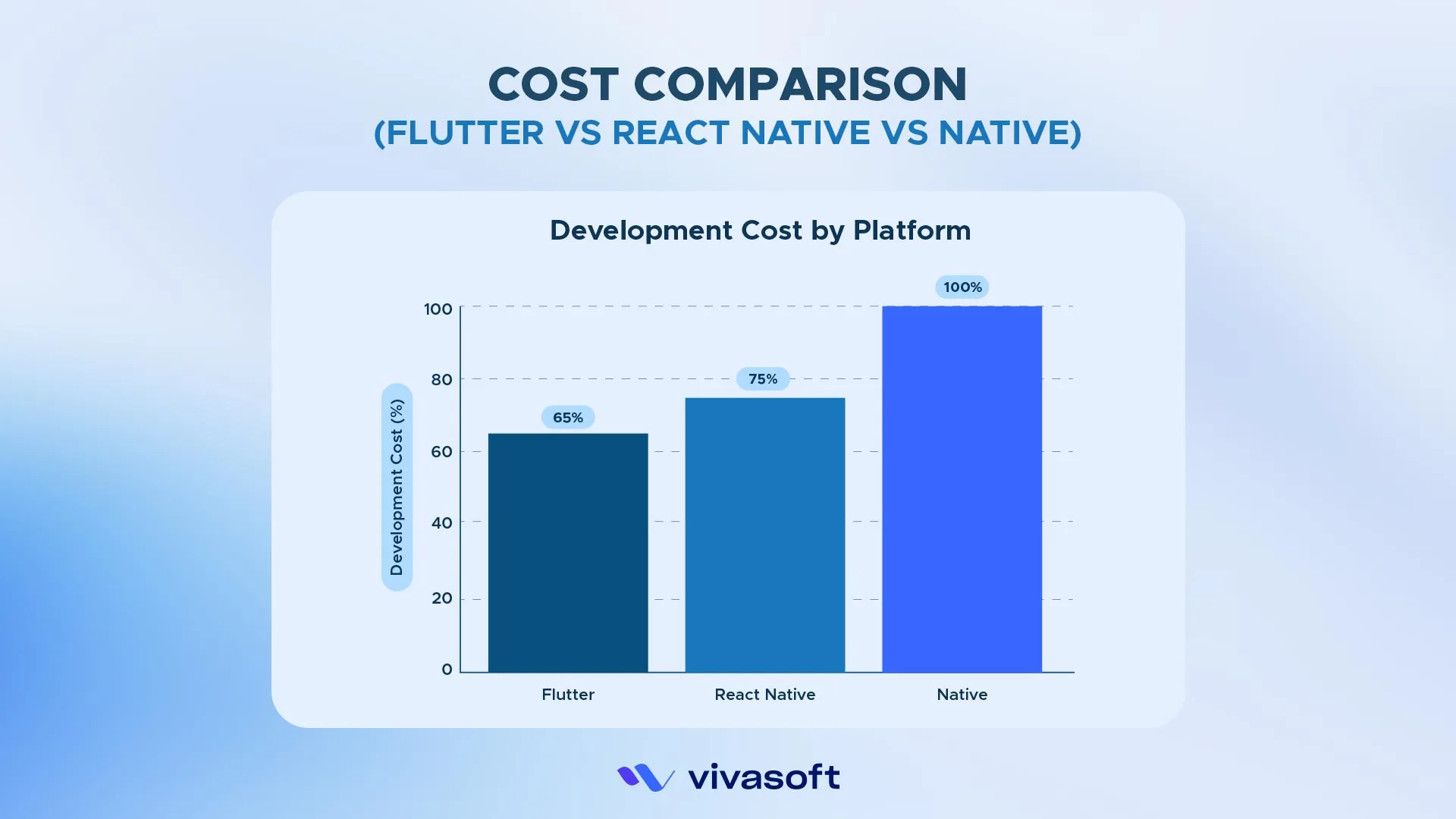
Since Flutter allows developers to work on a single Dart codebase for multiple platforms. You won’t need to hire different teams to build separate iOS and Android versions. Startups can deploy MVPs quickly and get market validation without investing much at first. Moreover, enterprises can maintain consistent project planning and make budgeting much easier.
- 1 team instead of 2: With Flutter, you only need to hire a single integrated team that will handle everything using a shared UI layer, reducing staffing costs.
- Faster launch: It allows you to implement and test app features rapidly and validate concepts faster.
- Lower maintenance cost: With the shared widget tree and single codebase, the development team can avoid repetitive engineering work and save a lot on long-term maintenance expenses.
Note: Developing a native app for iOS and Android often costs $300K+. Whereas on Flutter, a team can deliver the same multi-platform product for nearly half the cost.
6. Strong Community Backed by Google
Flutter has a large and active community backed by Google. Developers easily access extensive tools and resources that streamline app development.
- Firebase integration: Flutter offers an amazing backend integration. You can easily add powerful backend features and make development faster.
- Frequent updates: Flutter is regularly updated with improvements, including new DevTools features, rendering upgrades, or Dart enhancements.
- Long-term stability: Google actively invests in Flutter to keep the framework and its related plugins reliable and stable.
Note: In November 2025, Flutter 3.38 and Dart 3.10 brought one of the most exciting updates of the year. The upgrades were packed with major language improvements and AI-enhanced workflows.
7. Rich Ecosystem & Plugin Support
Flutter has a large library of ready-made plugins. With the available plugins, developers can access any of the needed device features or complex functionalities without writing the native code from scratch.
- Pre-built third-party libraries: Ready-to-run plugins like shared_preferences or flutter_secure_storage that save time and simplify complexity.
- Advanced Routing Stacks: Flutter offers advanced functionality to implement scalable navigation, improving the user experience.
8. Future-Proof Technology With Growing Corporate Adoption
Beyond just current trends, Flutter is likely making a stand for future enterprise app development. Leading companies like Alibaba, BMW, Google Ads, and eBay Motors are already choosing Flutter for their mobile apps.
9. Easy integration with Firebase and backend services
Flutter offers easier Firebase integration, which makes the backend services much more efficient. Businesses can manage Firebase authentication, notifications, or analytics directly within Flutter. Moreover, the single piece of Dart code handles all server communication. It can communicate with REST APIs or serverless functions, keeping your app stable at all networking clients.
10. Scalability for Enterprise-Level Applications
Flutter offers super scalability for enterprise-grade games. The advanced modular architecture allows developers to organize the app into modular layers. Each layer manages clear code patterns with specific reusable widgets and logic written in Dart. Thus, development teams can easily add new features or update existing ones and maintain consistent UI performance.
Why Does It Matter for Modern App Development?
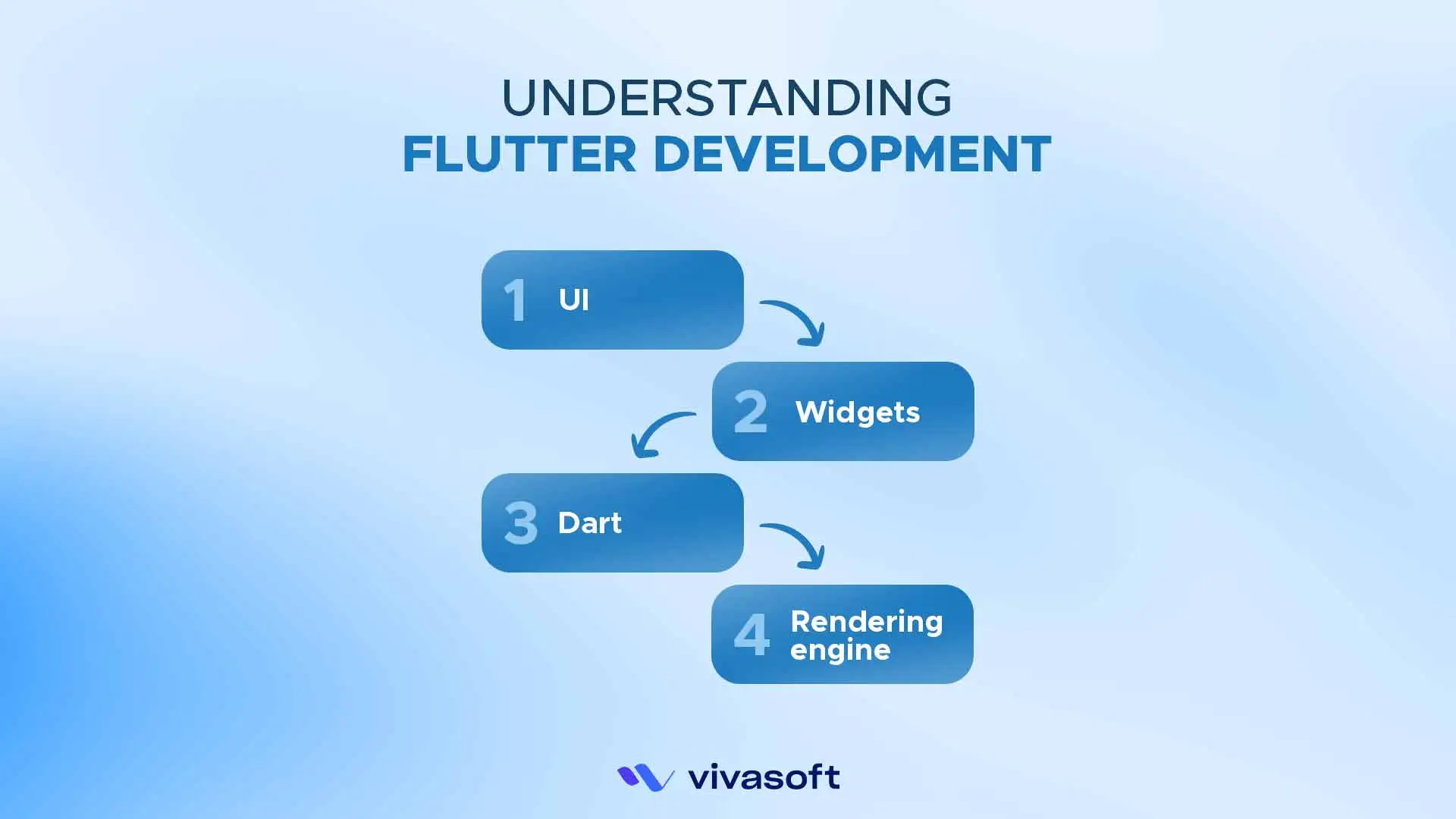
The global usage of Flutter for cross-platform mobile development is growing fast. Around 45% of cross-platform developers use Flutter, and there are major reasons for this wide adoption.
Have a look:
- UI Toolkit: Flutter comes with a ready-to-use UI toolkit that includes its customizable widgets. It helps render everything on the screen using the Skia engine. You will get stable frame timing and professional layout handling.
- Single Codebase: You will write the code once in Dart and deploy everywhere. It helps reduce development time, cost, and even maintenance effort.
- Widget-Based Architecture: Everything in Flutter, starting from the text, buttons, or layouts, is a widget. These are highly customizable, and you can edit anything as needed. This offers superb control over the UI.
- Native Compilation: Flutter converts the Dart language into native ARM machine code and x86-64 libraries. This makes apps faster to start on any screen. They are even more responsive when interacting with the UI, like a native performance.
Why Flutter Is Better Than Traditional Native Development
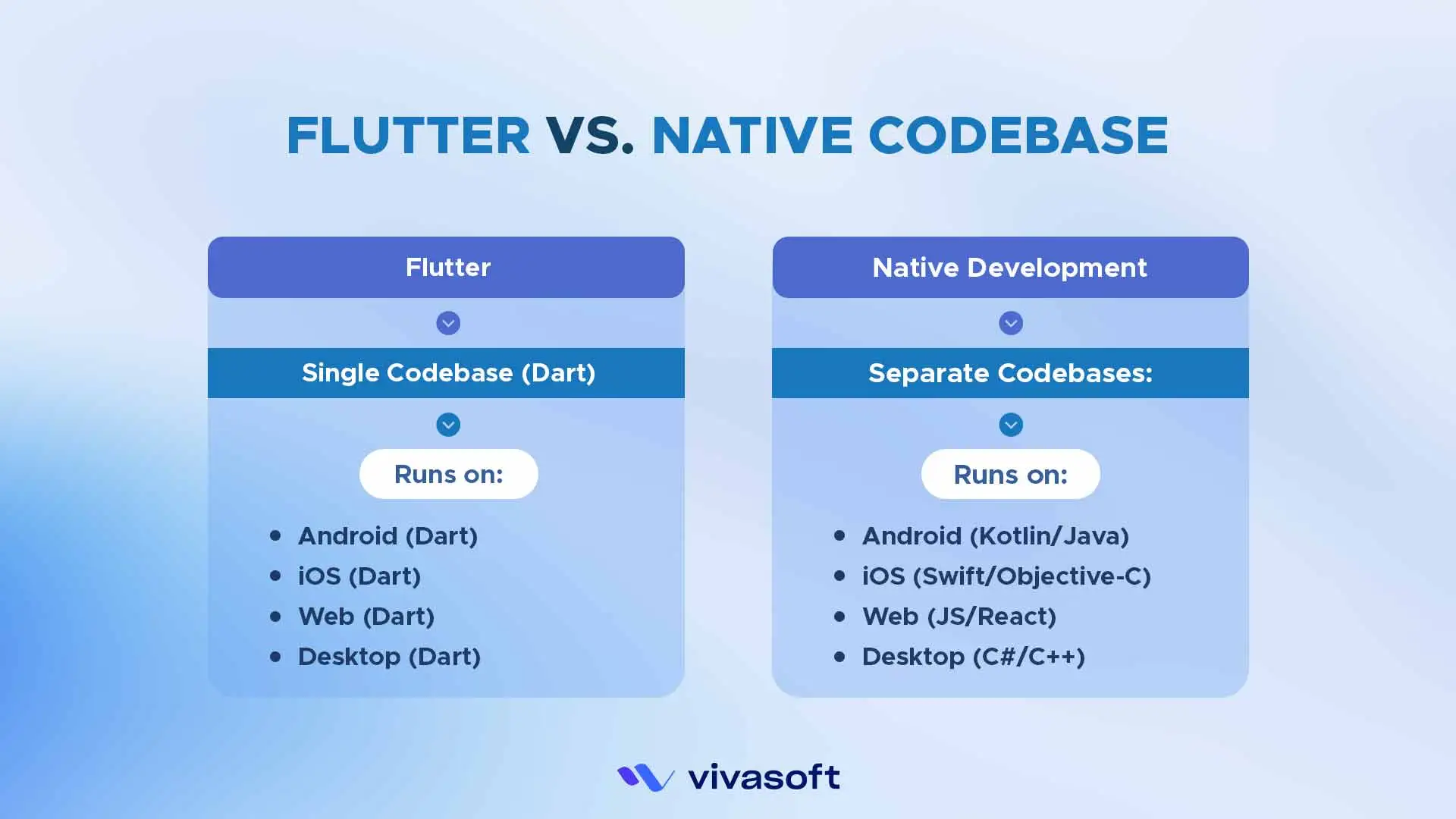
With the faster releases and developer-friendly iterations, Flutter offers cost-effective and smarter multi-platform deployment compared to traditional native builds. Here is a quick comparison table on Flutter vs native development to get clear knowledge.
| Factor | Flutter | Native Development |
|---|---|---|
| Time to Market | Faster since a single codebase handles all platforms | Slower, as separate code is required for iOS and Android |
| Performance | Delivers near-native performance | Fully native performance, slightly better in some cases |
| UI Consistency | Looks the same across all devices | Can vary between platforms |
| Cost | Lower, requiring only one team and codebase | Higher due to the need for separate teams and codebases |
| Maintenance | Easier with updates applied to all platforms at once | More complex, with updates needed for each platform separately |
Disadvantages of Flutter App Development
Flutter offers impressive speed and professional control over UI, but the platform is not without challenges. These are some drawbacks of Flutter you should know.
- Larger app size: The apps are mostly bundled with the entire Flutter engine and the Dart runtime. It makes the app size bigger and affects download rates or storage.
- Limited native libraries: Flutter has fewer third-party libraries. Some device features have SDKs available only for native platforms. Developers may need extra work to connect Flutter with native code, which takes more time.
- Learning curve for Dart: It can be hard for beginners to cope with the Flutter framework. They often struggle with async execution, isolates, and immutable widget trees, which can take 2–4 weeks just to become familiar with.
- Not ideal for extremely native use cases: Developers find it difficult to handle fully native tasks using only Flutter. GPU-heavy games and video streaming run faster in native code, as it can interact directly with the device.
Is Flutter the Right Choice for Your App?
Flutter is the ideal framework if you want faster development and to meet market demand in a cost-effective way. Businesses can rely on Flutter for native-like applications across all industries.
Let’s have a clear overview on choosing Flutter:
When Flutter Is a Good Choice for App Building?
- To quickly build and test features and validate their product.
- For consistent branding and improved user experience on all devices.
- To scale the app as your business, video, or database grows.
- To offer native-compiled apps to engage new users.
- For real-time features like chat or live streaming with smooth 60fps animations.
When Flutter is Not the Right Pick?
- When your app relies heavily on platform-specific APIs or hardware features.
- To build apps that need extensive use of native SDKs from third-party services.
- When you need to integrate deeply with platform-specific UI patterns.
- To build an app with heavy 3D graphics, gaming engines, or augmented reality.
Real-World Apps Built With Flutter
Companies worldwide have chosen Flutter for its performance, development speed. Here is the list of the world’s most demanding applications across industries that have utilized Flutter and are consistently growing:
Google Ads
Google has its own advertising platform built on Flutter. With this, marketers can manage campaigns and view performance metrics with reduced maintenance overhead.
Alibaba
Alibaba used Flutter to build the Xianyu secondhand marketplace app. It has around 50 million users globally. The company chose this framework for its cross-platform capabilities to create a visually appealing experience for its users.
BMW
BMW developed its My BMW App using Flutter in July 2020. The app is now available in 47 countries across five continents. It connects drivers to their vehicles for remote functions. Such as checking charging status and accessing quick navigation.
eBay Motors
In 2018, the eBay Motors team needed an efficient app that could run on both Android and iOS, with a full feature set and the same performance as the main eBay app. Using Flutter, the team launched a beta version in just three months.
All Things Considered: Should You Choose Flutter in 2025?
Flutter has moved beyond being just another framework. With all its amazing advancements, it’s now the backbone of app development with super performance. If you want to enjoy the exciting benefits of Flutter app development, partner with a skilled Flutter app development team and join the businesses already building the future.
FAQs
How to start flutter app development?
For students: Start with free Flutter docs & YouTube tutorials. Install Flutter SDK & VS Code, build simple apps like a calculator.
For developers: Learn Dart, understand widget lifecycle. Use provider for state management, explore pub.dev for packages.
For enterprise: Evaluate for cross-platform needs, hire a Flutter app development company, and start with a pilot project.
How do I learn Flutter step by step?
Begin with Dart basics, then learn Flutter widgets, practice layouts, and understand navigation. After that, build simple apps and gradually move on to more complex ones.
Can I use native features (camera, GPS) in Flutter?
Yes, via plugins (pub.dev) or platform channels for custom native code.
How is the performance compared to native?
Excellent for UI-intensive apps, as it compiles to native ARM code.