SQL Server Database Source Control using Visual Studio: Git
Khairul Alam
Published on
28.08.2024
Time to Read
3min
[rank_math_breadcrumb]
Table of Contents
In this brief article, we will see how to setup SQL Server Database Source Control using Visual Studio step by step —
1. Create a new repository to GitHub
2. Clone the repository to local directory
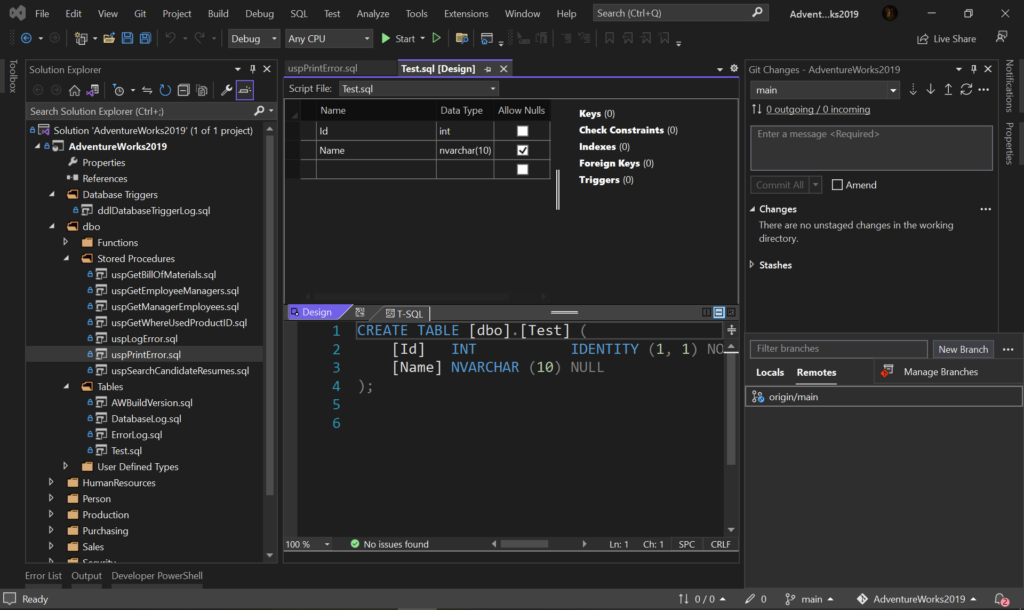
3. Create a new Sql Server Database project inside the repository
4. Right click on the project -> Import -> Select Database or Data-tier Application(*.dacpac)
For Data-tier Application(*.dacpac) option, Select/Browse the file then click on ’Start’.
For Database option, Select Connection of the Source Sql Server Database then click on ’Start’. [But this option is not available in Visual Studio Community Edition]
5. Now update a Stored procedure (Add comment) from source Sql Server Database as well as create a new table for testing purpose.
6. To compare the Source Database and our target project, Right click on the project name the select ‘Schema Compare’
7. Select Source Database and Target Project then click on ‘Compare Button’
8. Check the changes
9. To update the Target Project/Source Control click on ‘Update’
10. Commit & Push the changes.
Thanks…
50+ companies rely on
our top 1% talent to scale
their dev teams.
Heartfelt appreciation to Vivasoft Limited for believing in my vision. Their talented developers can take any challenges against all odds and helped to bring Klikit into life.appreciation to Vivasoft Limited for believing in my vision. Their talented developers can take any challenges.
Have you ever wondered how to smooth-running your .Net integration tests using Docker? Imagine the efficiency of running your tests within isolated containers, ensuring consistent environments every time.